Case study
- Role
- Sole developer
- Organisation
- Personal project
Katie Jayne
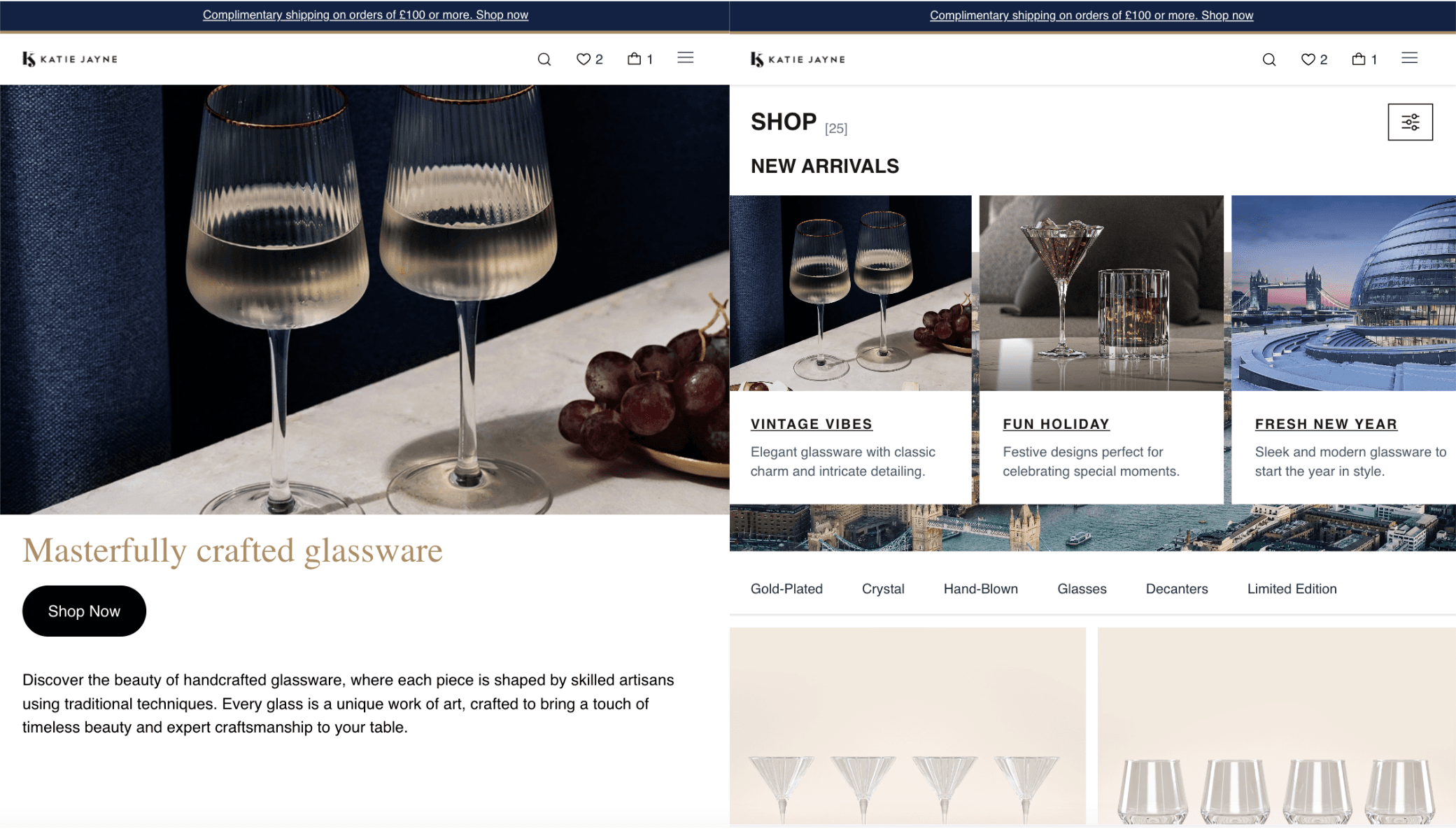
A storefront for a premium glassware brand: catalogue browsing, filtering and sorting, product detail, basket, checkout and a mailing list. Built to production standards rather than as a demo. The interesting parts are the ones a real shop would need on day one.
01 / Overview
What I did.
My first commercial-standard project in React and Next.js, and a deliberate exercise in the parts of front-end work that only show up at scale: shared state that many unrelated components read and write, persistence across reloads, and tests that cover journeys rather than functions. I built all of it: components, state, routing, integrations and the end-to-end suite.
02 / Architecture
Layers listed outermost first.
How it's put together.
A Next.js application with a single source of truth for the basket. Everything else is presentational: pages compose components, components read from the store, and the store is the only thing that knows what is in the basket or how much it costs.
Routing & rendering
Pages and product URLs.
Next.js with dynamic routes per product and per collection, so every item in the catalogue is a real, linkable, indexable URL rather than a client-side modal.
State
The basket, and only one of it.
Redux Toolkit slices per concern: basket, catalogue filters, mailing list. The basket is read by the header count, the basket page, the checkout summary and the product page at once, which is exactly the situation slices are for.
Persistence
Surviving a reload.
The basket is mirrored to localStorage and rehydrated on load, so closing the tab does not throw away a half-built order, with no account or backend session required.
Components & hooks
Reusable presentation.
Typed components with custom hooks for the repeated behaviour (filtering, sorting, responsive navigation) so the logic is tested once and used everywhere.
Integrations
Capturing interest.
Mailchimp for mailing list signup, handled through the application rather than an embedded third-party form so the styling and validation match everything else.
Testing
The journeys that matter.
Playwright covering browsing, adding to the basket and checking out, across viewports, because those are the paths where a break costs a sale.
03 / Decisions
Each of these had a credible alternative. The trade-off is stated, not hidden.
Choices, and what they cost.
Redux Toolkit for the basket, not React Context
- Chose
- Redux Toolkit slices
- Instead of
- React Context with a reducer
- Component-local state lifted as needed
- Why
- The basket is written from product cards and read by the header, the basket page and checkout, components with no ancestor relationship worth sharing. Context would re-render every consumer on any change and gives no view of what happened; Redux Toolkit gives selectors, so a component only re-renders for the slice it actually reads, and a devtools timeline showing exactly which action changed the total.
- Trade-off
- More ceremony than Context for state this small, and a dependency to keep current. Justified here because the basket is the one piece of state everything touches, not by a general preference for Redux.
localStorage persistence rather than a server-side session
- Chose
- Mirroring the basket to localStorage and rehydrating on load
- Instead of
- A server session tied to a user account
- Accepting that a reload empties the basket
- Why
- Losing a basket on refresh is the single most annoying thing a storefront can do, and fixing it did not require accounts, a database or authentication, which would have been a large amount of infrastructure for one behaviour. localStorage bought the whole benefit for very little.
- Trade-off
- The basket is per-browser: it does not follow the customer to their phone, and it has to be rehydrated carefully to avoid a server/client markup mismatch on first paint.
Playwright end-to-end tests over unit tests alone
- Chose
- End-to-end coverage of the purchase journey
- Instead of
- Unit tests on components and reducers only
- Manual testing before each deploy
- Why
- Every unit in this app can pass while the thing that matters is broken: a routing change, a hydration mismatch or a state bug between two correct components. Testing the whole path from browsing to basket to checkout in a real browser catches the class of failure that actually loses a sale, and catches it across viewports.
- Trade-off
- Slower and more brittle than unit tests, so it is deliberately scoped to the critical path rather than used for everything.
TypeScript throughout, including the catalogue data
- Chose
- Typed product, price and basket-line models
- Instead of
- JavaScript with runtime checks at the edges
- Why
- Commerce bugs are shape bugs: a missing variant, a price as a string, a quantity that is undefined. Those are precisely the mistakes a type system catches for free, and they are the ones that turn into wrong totals rather than visible crashes.
- Trade-off
- Types describe the code, not the data that arrives at runtime, so they are not a substitute for validating an API response, and it is easy to mistake one for the other.
04 / Stack
Grouped by the job they do rather than listed as a keyword run.
Technologies.
- Application
- Styling
- State
- Testing
- Integrations
- Hosting
05 / Gallery
Select any image to view it full size.
How it looks.
Mobile
Homepage. Catalogue. Product detail, on its own route rather than in a modal. Filtering and sorting. Basket, restored from localStorage after a reload. Checkout, the end of the tested journey.
Desktop
Desktop navigation. Product detail on a wide viewport. Mailing list, wired to Mailchimp.
06 / Outcome
Where it landed.
The project that took me from learning React to building with it. It stands as a complete, deployed storefront rather than a tutorial result, and the parts I would keep (one owner for shared state, persistence where losing data is unacceptable, and tests on journeys instead of units) are the habits I have carried into production work since.